아두이노 나노 (arduino nano) 의 pin datasheet (LCD I2C를 하기 위한)
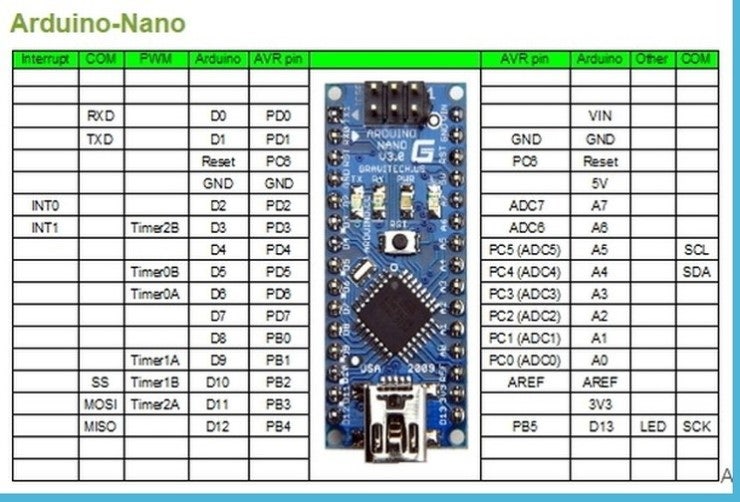
사진 출처: http://www.arduinotutorialonline.com/2018/01/how-to-connect-i2c-lcd-display-to_12.html LCD I2C : https://electronicsprojectshub.com/i2c-lcd-display-arduino/
How to Connect I2C LCD Display to Arduino - Electronics Projects Hub In this tutorial, we will see how to connect i2c LCD display (liquid crystal display). Arduino LCD connections are easy to connect by reading this article. In this tutorial, we will see how to connect i2c LCD display (liquid crystal display). Arduino LCD connections are easy to connect by reading this article.
LCD I2C를 사용하기 위해서는 A4와 A5 ouput이 중요하다. A는 아날로그를 , D는 디지털을 뜻한다. I2C가 장착된 LCD 모듈의 경우 반드시 SCL, SDA로 제어한다.
I2C없는 LCD는 디지털핀에 일일이 꽂아서 제어하는 것 같다. https://howtomechatronics.com/tutorials/arduino/lcd-tutorial/
Arduino LCD Tutorial | How To Connect an LCD to Arduino In this Arduino LCD Tutorial we will learn how to connect an LCD (Liquid Crystal Display) to the Arduino board. LCDs like these are very popular and broadly used in electronics projects as they are good for displaying information like sensors data from your project, and also they are very cheap. In this Arduino LCD Tutorial we will learn how to connect an LCD (Liquid Crystal Display) to the Arduino board. LCDs like these are very popular and broadly used in electronics projects as they are good for displaying information like sensors data from your project, and also they are very cheap.
어젯밤에 열심히 lcd 16x2 0x27을 작동시켜보려고 노력하였으나 아래와 같은 이상한 문자만 나와서 시간을 허비했다. 덕분에 라이브러리 다루는 법이나 저장 경로에 꽤나 익숙해졌다. 결국 산 곳에 네이버 톡톡문의하였더니 불량인것 같다고 월요일에 새제품으로 보내준다고 했다. 아래와 같은 표시에러는 아무리 검색해도 최초다. 모든 문자(영어, 숫자, 한글, 커스텀문자) 통틀어 전부 아래와 같은 문자들이 자리만 바꿔 나타나며, 커서 위치도 의도한 곳에 있지 않다. 제어가 가능한 부분은 딱 한가지, 백라이트 켜고 끄는 정도였다. ㅎㅎㅎ [
](#)