코드 project 내에서 코드를 트리구조로 한 파일에 생성하기 (python 코드) (1)
chatgpt에게 묻기 위해서는 단편적인 코드만이 아니라 폴더 구조와 전체 구조 맥락을 함께 줘야 좋을 때가 있습니다. 이 때 일일이 코드를 복붙하는 것을 대신 자동화해줄 수 있습니다.
아래는 각각 제가 사용하는 자동화 코드 스크립트입니다.
cmd에서
python collect_tree.py 로 각각 사용하거나,
python run.py 로 한 번에 실행하시면 됩니다.
이걸 dart 언어로도 작성했었는데, 지금 생각해보니 dart 언어로는 편하게 데스크탑앱으로 빌드해서 공유드려도 될것 같네요. 원하시는 분 계시면 답글 달아주세요. ㅎㅎ
1
2
3
4
5
6
7
8
9
10
11
12
13
14
15
16
17
18
19
20
21
22
23
24
25
26
27
28
29
30
31
32
# dev_utils/collect_tree.py

import os
import argparse

def write_py_file_tree_with_top_folder(root_folder, output_file, type='py'):
    root_folder_name = os.path.basename(os.path.normpath(root_folder))  # 최상위 폴더명 가져오기
    with open(output_file, 'w') as file:
        for dirpath, _, filenames in os.walk(root_folder):
            # type 확장자 파일만 필터링
            py_files = [f for f in filenames if f.endswith('.' + type)]
            if py_files:
                for py_file in py_files:
                    # 경로와 파일명을 원하는 형식으로 작성
                    relative_path = os.path.relpath(dirpath, root_folder)
                    full_path = os.path.join(root_folder_name, relative_path)  # 상위 폴더명 포함 경로
                    file.write(f"{full_path}: {py_file}\n")
    print(output_file, '파일이 생성되었습니다.')

### 사용 예시: python collect_tree.py -p C:\{프로젝트 경로} -o dart_file_tree.txt -t dart
if __name__ == "__main__":
    defaultPath:str = r'C:\{트리 구조를 보고 싶은 폴더 경로}'
    defaultOutput:str = os.path.join(os.path.dirname(__file__), "dart_file_tree.txt")
    defaultType:str = 'dart'
    parser = argparse.ArgumentParser(description="Generate a tree of .py files with top folder.")
    parser.add_argument("-p", "--path", default=defaultPath, help="The root folder to scan.")
    parser.add_argument("-o", "--output", default= defaultOutput, help="The output file to write the tree.")
    parser.add_argument("-t", "--type", default=defaultType, help="The file type to scan.")

    args = parser.parse_args()

    write_py_file_tree_with_top_folder(args.path, args.output, args.type)
1
2
3
4
5
6
7
8
9
10
11
12
13
14
15
16
17
18
19
20
21
22
23
24
25
26
27
28
29
30
31
32
33
34
35
36
37
38
39
40
41
# dev_utils/scan_tree_codes.py

import os
import argparse

def write_py_file_tree_and_content(root_folder, output_file, type='py'):
    root_folder_name = os.path.basename(os.path.normpath(root_folder))  # 최상위 폴더명 가져오기
    with open(output_file, 'w', encoding='utf-8') as file:  # utf-8 인코딩으로 파일 열기
        for dirpath, _, filenames in os.walk(root_folder):
            # type 확장자 파일만 필터링
            py_files = [f for f in filenames if f.endswith('.' + type)]
            if py_files:
                for py_file in py_files:
                    # 경로와 파일명을 원하는 형식으로 작성
                    relative_path = os.path.relpath(dirpath, root_folder)
                    full_path = os.path.join(root_folder_name, relative_path)  # 상위 폴더명 포함 경로
                    file_path = os.path.join(dirpath, py_file)

                    # 경로 출력
                    file.write(f"# {full_path}: {py_file}\n")

                    # 파일 내용을 출력
                    file.write("[\n")
                    with open(file_path, 'r', encoding='utf-8') as py_file_content:
                        content = py_file_content.read()
                        file.write(content)
                    file.write("]\n\n")
    print(output_file, '파일이 생성되었습니다.')

### 사용 예시: python scan_tree_codes.py -p C:\{프로젝트 경로} -o dart_file_tree.txt -t dart
if __name__ == "__main__":
    defaultPath:str = r'C:\{트리 구조를 보고 싶은 폴더 경로}'
    defaultOutput:str = os.path.join(os.path.dirname(__file__), "dart_file_source_tree.txt")
    defaultType:str = 'dart'
    parser = argparse.ArgumentParser(description="Generate a tree of .py files with content.")
    parser.add_argument("-p", "--path", default=defaultPath, help="The root folder to scan. Default is the current directory.")
    parser.add_argument("-o", "--output", default=defaultOutput, help="The output file to write the tree and content. Default is 'output.txt'.")
    parser.add_argument("-t", "--type", default=defaultType, help="The file type to scan. Default is 'py'.")
    args = parser.parse_args()

    write_py_file_tree_and_content(args.path, args.output, args.type)
1
2
3
4
5
6
7
8
9
10
11
12
13
14
15
16
17
18
19
20
21
22
23
24
25
26
27
28
29
30
31
32
33
34
35
36
# dev_utils/run.py

import subprocess
import argparse

def run_collect_tree(path, output, type="dart"):
    print("Running collect_tree...")
    subprocess.run(["python", "collect_tree.py", "-p", path, "-o", output, "-t", type])

def run_scan_tree_codes(path, output, type="dart"):
    print("Running scan_tree_codes...")
    subprocess.run(["python", "scan_tree_codes.py", "-p", path, "-o", output, "-t", type])

if __name__ == "__main__":
    subPath:str = ''
    ## subPath를 더한 defaultPath.
    defaultPath = r'C:\{프로젝트 경로}' + '\\' + subPath
    ## subPath + .txt
    defaultOutput_1:str = subPath + '.txt'
    ## subPath + _codes.txt
    defaultOutput_2:str = subPath + '_codes.txt'
    defaultType:str = 'dart'

    parser = argparse.ArgumentParser(description="Run collect_tree and scan_tree_codes scripts sequentially.")
    parser.add_argument("-p", "--path", default=defaultPath, help="The root folder to scan. Default is the current directory.")
    parser.add_argument("-o1", "--output1", default=defaultOutput_1, help="The output file for collect_tree. Default is 'tree_output.txt'.")
    parser.add_argument("-o2", "--output2", default=defaultOutput_2, help="The output file for scan_tree_codes. Default is 'view_model_states.txt'.")
    parser.add_argument("-t", "--type", default=defaultType, help="The file type to scan. Default is 'dart'.")

    args = parser.parse_args()

    # 첫 번째 메서드 실행 (collect_tree)
    run_collect_tree(args.path, args.output1, args.type)

    # 두 번째 메서드 실행 (scan_tree_codes)
    run_scan_tree_codes(args.path, args.output2, args.type)
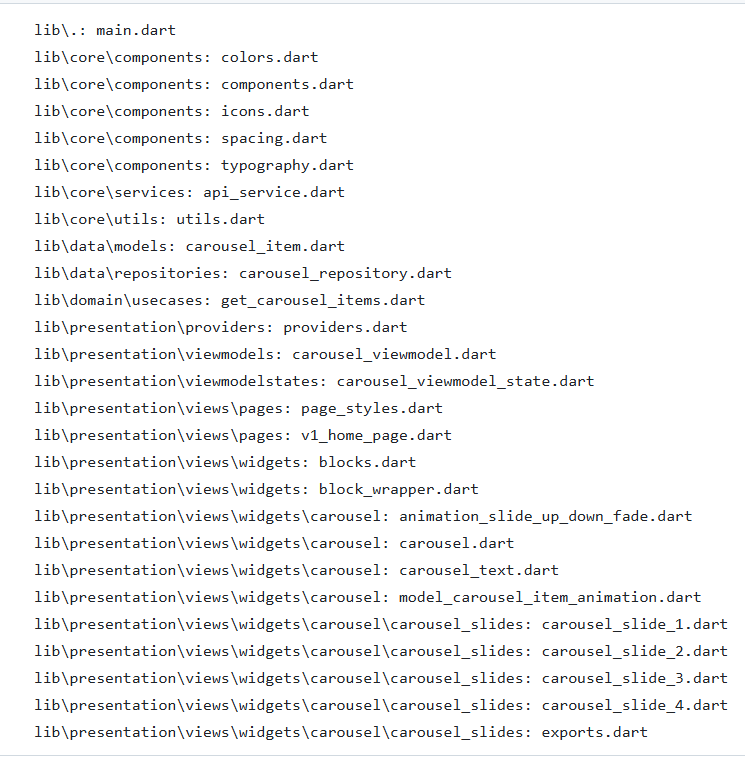
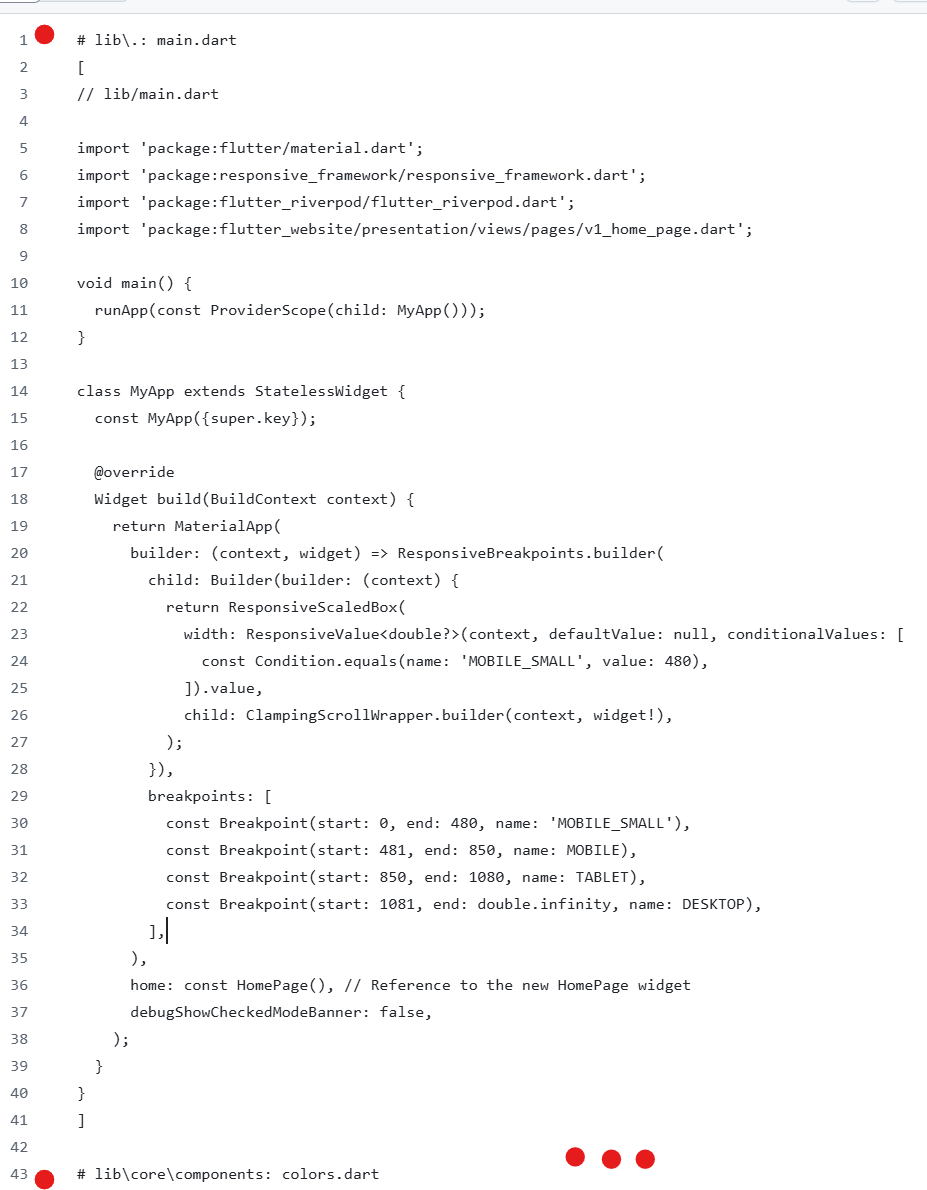
결과는 이런 식으로 나옵니다.
이어서..
[20241212] 코드 project 내에서 코드를 트리구조로 한 파일에 생성하기(python 코드) (2) 남YK의 블로그 남YK의 블로그
이 기사는 저작권자의 CC BY 4.0 라이센스를 따릅니다.