chatgpt로 simple flutter code 만들기(21) - 리펙토링. 자주 쓰는 코드 모듈화
앱을 만들다보니 snackbar와 loadingIndicator를 제가 자주 쓰고 있었습니다. 그래서 따로 위젯으로 빼서 모듈화 하기로 했습니다.
1. Snackbar snackbar는 다음과 같이 꺼내서 쓰면됩니다.
1
2
3
4
5
6
7
8
9
10
// Open Snackbar with text and duration
void _showSnackbar(BuildContext context, String text, int duration) {
  ScaffoldMessenger.of(context).showSnackBar(
    SnackBar(
      content: Text(text, style: const TextStyle(color: Colors.white)),
      backgroundColor: Colors.black,
      duration: Duration(seconds: duration),
    ),
  );
}
'몇 초' 동안 '어떤 텍스트'를 스낵바에 띄울 것인지 전달하면 됩니다.
사용법은 다음과 같습니다.
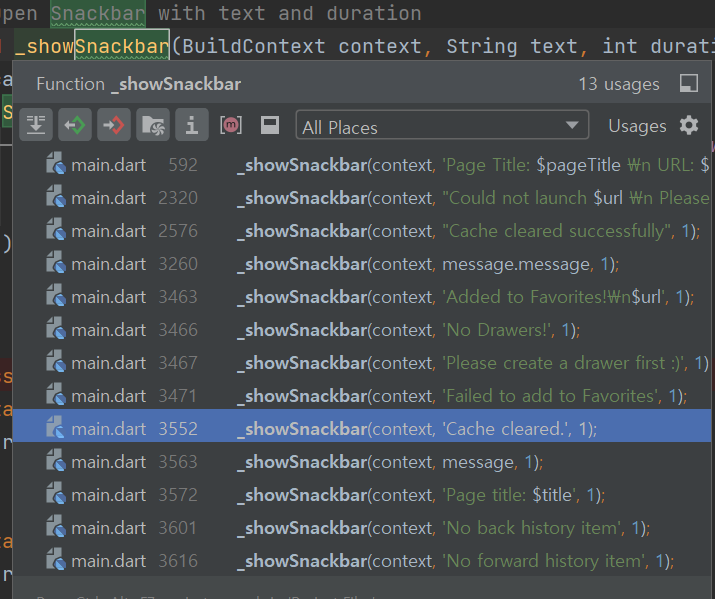
onPressed(), onMessageReceived(), onTap() 등등 이벤트가 일어나는 곳에 스낵바를 호출할 때 간편하게 쓰면됩니다.
2. CircularProgressIndicator
로딩 상태임을 나타내주는 인디케이터 외에는 반투명 검정색의 ModalBarrier(덮은 다른 위젯들은 터치불가한 상태)으로 덮어주는 역할을 모듈화했습니다.
CircularProgressIndicator는 사용할 때 Stack(children:[])에 child로 들어가 있습니다.
1
2
3
4
5
6
7
8
9
10
11
12
13
14
15
16
17
18
19
20
21
22
23
class LoadingIndicatorOverlay extends StatelessWidget {
  const LoadingIndicatorOverlay({super.key});

  @override
  Widget build(BuildContext context) {
    return const Stack(
      children: [
        Opacity(
          opacity: 0.5,
          child: ModalBarrier(
            dismissible: false,
            color: Colors.black,
          ),
        ),
        Center(
          child: CircularProgressIndicator(
            color: Colors.lightBlueAccent,
          ),
        ),
      ],
    );
  }
}
사용할 때는 이렇게 합니다.
1
2
3
4
5
6
7
8
9
10
11
12
     scaffold(
              // other codes

        body: Stack(
          children: [
                      // other codes

                      // call LoadingIndicatorOverlay custom function.
                      if (isLoading) const LoadingIndicatorOverlay(),
                    ]
                    )
              )
코드에 있는 bool isLoading 은 로딩중인지 여부를 나타내는 변수입니다.
한 위젯에서 isLoading의 상태변화가 일어나면 좋겠지만, 그렇지 않은 경우 provider로 상태 변화를 저장해주는 방법이 저에게는 아직 최선이라고 생각했습니다.
그래서 저는 riverpod의 provider를 사용해서 이 변수의 상태관리를 했습니다.
위젯 빌드 오버라이드에는 다음을 선언해주고,
1
bool isLoading = ref.watch(isLoadingProvider);
코드 맨 처음에는 provider를 선언했었습니다.
1
2
// Create a provider for the loading indicator
final isLoadingProvider = StateProvider((ref) => false);
매번 상태 저장 함수를 긴 명령어로 Call 하는 것이 번거롭다고 생각되어 static클래스에 넣어서 사용해보았습니다.
1
2
3
4
5
6
7
8
9
class LoadingUtil {
  static void showLoading(WidgetRef ref) {
    ref.read(isLoadingProvider.notifier).state = true;
  }

  static void hideLoading(WidgetRef ref) {
    ref.read(isLoadingProvider.notifier).state = false;
  }
}
여담)
제가 로딩바의 모듈화를 고민했던 계기는 바로 다음 함수 때문입니다.
1
2
3
4
5
6
7
8
9
10
11
12
13
14
15
16
17
18
19
20
21
22
23
24
25
26
27
28
29
// Improved function to handle shared URLs and YouTube videos
  void _handleSharedText(String sharedUrl) async {
    if (_instance != null) {
      // Show the loading indicator
      LoadingUtil.showLoading(ref);

      // Use the existing instance to handle the shared URL
      String title = await fetchPageTitle(sharedUrl);
      String? siteImageUrl;

      // Check if the shared URL is a YouTube video
        if (sharedUrl.contains("youtube.com") || sharedUrl.contains("youtu.be")) {
          siteImageUrl = await fetchYouTubeThumbnail(sharedUrl);

          // Hide the loading indicator
          LoadingUtil.hideLoading(ref);
          _instance!._showSharedYouTubeContentDialog(
              sharedUrl, title, siteImageUrl ?? '');
        } else { // Handle other shared URLs
          siteImageUrl = await fetchSiteImageUrl(sharedUrl);

          // Hide the loading indicator
          LoadingUtil.hideLoading(ref);
          _instance!
              ._showSharedContentDialog(sharedUrl, title, siteImageUrl ?? '');
        }

    }
  }
1
2
3
4
5
6
7
8
9
10
11
12
13
14
15
16
17
18
19
20
21
22
23
24
25
26
27
28
29
// Function to fetch page thumbnail from URL
Future fetchSiteImageUrl(String blogUrl) async {
  try {
    Uri uri = Uri.parse(blogUrl);
    String? siteImageUrl;

    printDebug("Fetching SiteImage: $uri");
    final response = await http.get(uri);

    if (response.statusCode == 200) {
      printDebug("Fetching SiteImage: ${response.statusCode}");
      var document = parse(response.body);
      var metaTag = document.querySelector('meta[property="og:image"]');
      siteImageUrl = metaTag?.attributes['content'];
    }
    // if the siteImageUrl is null, try to fetch the favicon
    if (siteImageUrl == null) {
      printDebug("Fetching SiteImage: Favicon");
      siteImageUrl = '${uri.scheme}://${uri.host}/favicon.ico';
    }

    // Check if the URL is valid
    // final imageResponse = await http.get(Uri.parse(siteImageUrl));
    return siteImageUrl;
  } catch (e) {
    printDebug("Error fetching SiteImage: $e");
  }
  return null;
}
원래는 로딩 지시자가 필요 없을만큼 fetching이 빠르게 일어났던 함수였는데,
구글에 연결할 때는 빠르지만, 네이버에 연결할 때는 너무 시간이 오래걸렸습니다.
그래서 기존에 잘 만들었던 다른 여러 기능들에도 분명 새로운 기능을 더하거나 새로운 테스트를 하게 될 경우 로딩 지시자가 필요해질 때가 있을 것 같았습니다.
구글에서 reponse를 받을 때는 굉장히 빠릅니다. 반면 네이버에서 받아올 떄는 굉장히 느립니다.
[영상]
+추가)
제가 자주 쓰는 printDebug모듈입니다.
1
2
3
4
5
6
void printDebug(Object message) {
  if (kDebugMode) {
    print(message);
  }
}
+추가) LoadingIndicator에 String Key를 넣어 개선.
1
2
3
4
              const LoadingIndicatorOverlay(keyIdentifier: 'fetching'),
              const LoadingIndicatorOverlay(keyIdentifier: 'settings'),
              const LoadingIndicatorOverlay(keyIdentifier: 'clearCache'),
              const LoadingIndicatorOverlay(keyIdentifier: 'resetThumbnails'),
1
2
3
// Create a provider for the loading indicator
final isLoadingProvider = StateProvider>((ref) => {});
1
2
3
4
5
6
7
8
9
10
11
12
13
14
15
16
17
18
19
20
21

class LoadingUtil {
  static void showLoading(WidgetRef ref, String key) {
// Update the map with the new loading state
    ref.read(isLoadingProvider.notifier).update((state) {
      final newState = Map.from(state ?? {});
      newState[key] = true;
      return newState;
    });
  }

  static void hideLoading(WidgetRef ref, String key) {
// Remove the loading state from the map
    ref.read(isLoadingProvider.notifier).update((state) {
      final newState = Map.from(state ?? {});
      newState.remove(key);
      return newState;
    });
  }
}
1
2
3
4
5
6
7
8
9
10
11
12
13
14
15
16
17
18
19
20
21
22
23
24
25
26
27
28
29
30
31
32
33
34
35

class LoadingIndicatorOverlay extends StatelessWidget {
  final String keyIdentifier;

  const LoadingIndicatorOverlay({super.key, required this.keyIdentifier});

  @override
  Widget build(BuildContext context) {
    return Consumer(builder: (context, ref, child) {
      final isLoadingMap = ref.watch(isLoadingProvider);
      final isCurrentKeyLoading = isLoadingMap[keyIdentifier] ?? false;

      if (isCurrentKeyLoading) {
        return const Stack(
          children: [
            Opacity(
              opacity: 0.5,
              child: ModalBarrier(
                dismissible: false,
                color: Colors.black,
              ),
            ),
            Center(
              child: CircularProgressIndicator(
                color: Colors.lightBlueAccent,
              ),
            ),
          ],
        );
      } else {
        return const SizedBox.shrink();
      }
    });
  }
}
+추가) 스낵바에 밀리초 단위를 추가하여 개선.
1
2
3
4
5
6
7
8
9
10
11
12
13
14
15
16
17
18
19
20
// Open Snackbar with text and duration
void _showSnackbar(BuildContext context, String text, int duration, {bool isMillis = false}) {
  if (isMillis == false ){
    ScaffoldMessenger.of(context).showSnackBar(
      SnackBar(
        content: Text(text, style: const TextStyle(color: Colors.white)),
        backgroundColor: Colors.black,
        duration: Duration(seconds: duration),
      ),
    );
  }else{
    ScaffoldMessenger.of(context).showSnackBar(
      SnackBar(
        content: Text(text, style: const TextStyle(color: Colors.white)),
        backgroundColor: Colors.black,
        duration: Duration(milliseconds: duration),
      ),
    );
  }
}