Flutter dialog 세로모드 강제하기
플러터의 dialog를 띄우다보면, 세로모드만 생각하고 만드는 경우가 있습니다. 이 경우 가로모드로 모바일기기를 회전시킬 경우 아래 사진처럼 특정 부분의 픽셀이 안보이는 문제가 발생할 수 있습니다.
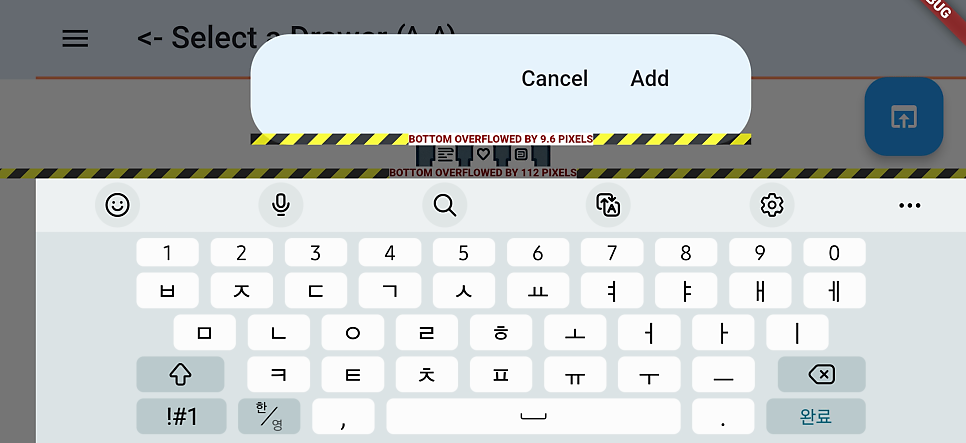
1
2
3
4
5
6
7
8
9
10
11
12
  // Lock to portrait mode before showing the dialog
  SystemChrome.setPreferredOrientations([
    DeviceOrientation.portraitUp,
    DeviceOrientation.portraitDown,
  ]);

  showDialog(
    // existing codes
  ).then((_) {
    // Unlock orientation after the dialog is dismissed
    SystemChrome.setPreferredOrientations(DeviceOrientation.values); // or however you manage your orientations
  });
다음은 저의 프로젝트에서 사용한 예시입니다.
1
2
3
4
5
6
7
8
9
10
11
12
13
14
15
16
17
18
19
20
21
22
23
24
25
import 'package:flutter/services.dart'; // Import services to access SystemChrome

void _showSharedYouTubeContentDialog(
    BuildContext context, WidgetRef ref, String sharedUrl, String title, String thumbnailUrl) {
  // Lock to portrait mode before showing the dialog
  SystemChrome.setPreferredOrientations([
    DeviceOrientation.portraitUp,
    DeviceOrientation.portraitDown,
  ]);

  showDialog(
    context: navigatorKey.currentState!.context,
    builder: (BuildContext dialogContext) {
      // ... your existing dialog code ...

      return AlertDialog(
        // ... the contents of your dialog ...
      );
    },
  ).then((_) {
    // Unlock orientation after the dialog is dismissed
    SystemChrome.setPreferredOrientations(DeviceOrientation.values); // or however you manage your orientations
  });
}
[영상]
이 기사는 저작권자의 CC BY 4.0 라이센스를 따릅니다.