[MCP] nvm의 node로 cursor mcp server 실행하기
보통 nvm을 쓰는 이유는 node의 다양한 버전을 따로 관리하기 위해서입니다.
비슷한 예로 flutter에서는 fvm(flutter version management), Python에서는 venv(virtual environment), 또는 conda 가 있죠.
저는 node도 프로젝트에 따라 다양한 버전을 따로 설치해서 사용하기 때문에 nvm을 쓰고 있었습니다.
그런데 mcp server를 실행해줄 때에는 nvm을 사용하는 법이 좀더 까다롭습니다.
왜냐하면 nvm에서 사용하려는 버전의 node가 있는 경로를 mcp마다 지정해줘야 하거든요.
일단 사용하려는 nvm에 node까지 설치되었는지 확인해줍니다.
1
2
3
4
# 관리자 권한으로 powershell 실행
nvm ls
nsm use "설치할node버전"
nvm install node
참고로 최신 node 버전을 설치하려면, 다음과 같은 명령어로 최신 설치가능 버전을 알 수 있습니다.
1
nvm use latest
원하는 버전의 npm과 node가 설치되었다면,
설치된 경로를 알아봅시다.
1
2
# powershell
get-Command nvm

윈도우의 경우는,
C:/Users/유저이름/AppData/Local/nvm
라고 하네요.
들어가보면 설치했던 여러 node들이 있습니다.
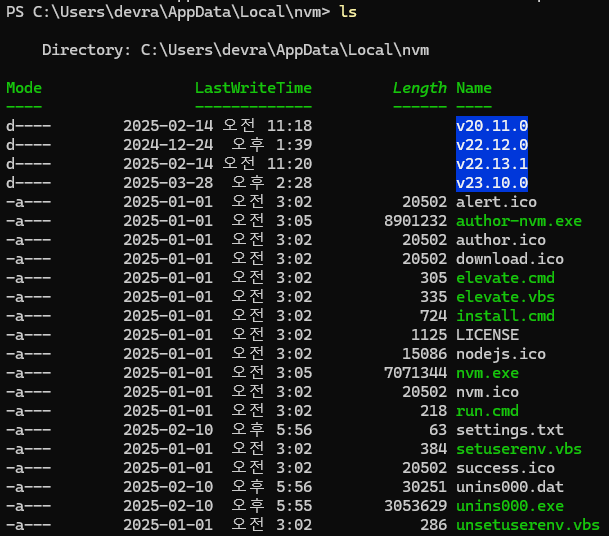
저는 v23.10.0 을 사용하려고 합니다.
예시로는 sequential-thinking mcp를 사용하겠습니다.
https://github.com/modelcontextprotocol/servers/tree/HEAD/src/sequentialthinking
노드에 전역으로 server-github mcp를 설치합니다.
1
npm i -g @modelcontextprotocol/server-sequential-thinking
잘 설치되었습니다!
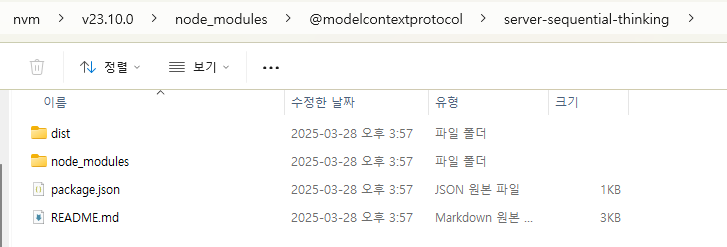
mcp.json에 다음과 같이 작성해줍니다.
1
2
3
4
5
6
7
8
9
10
{
    "mcpServers": {
        "github": {
            "command": "C:/Users/유저/AppData/Local/nvm/v23.10.0/node",
            "args": [
                "C:/Users/유저/AppData/Local/nvm/v23.10.0/node_modules/@modelcontextprotocol/server-sequential-thinking/dist/index.js"
            ],
        }
    }
}
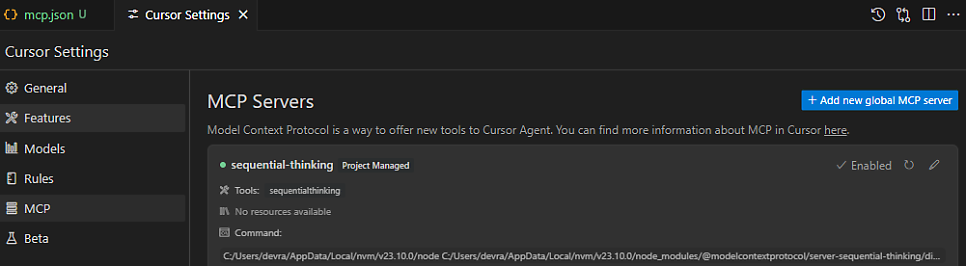
그리고 잘 활성화 되었습니다.

MCP Services Not Working? A Silver Bullet Approach | Claude MCP Agent Tutorial MCP servers turn Claude into an AI agent that can seamlessly browse the web, manage your files and automate browser tasks. Let's get to… MCP servers turn Claude into an AI agent that can seamlessly browse the web, manage your files and automate browser tasks. Let's get to…
https://gist.github.com/feveromo/7a340d7795fca1ccd535a5802b976e1f
MCP-Windows MCP-Windows. GitHub Gist: instantly share code, notes, and snippets. MCP-Windows. GitHub Gist: instantly share code, notes, and snippets.