django에서 smtp 메일 보내기 테스트

구글 gmail 앱 비밀번호 설정과 일반 파이썬 환경에서 smtp 메일링 테스트를 하는 과정이 선행되어야 합니다.
혹시 아직 안되어 있다면,
이전 포스팅을 참조해주세요.
https://blog.naver.com/devramyun/223663398108
[20241117] smtp 구글 gmail 자동 보내기 테스트 구글 gmail에서는 간단한 설정으로 smtp 메일을 보내게 할 수 있습니다. 이전 포스팅에서는 gmail에서 앱 … 구글 gmail에서는 간단한 설정으로 smtp 메일을 보내게 할 수 있습니다. 이전 포스팅에서는 gmail에서 앱 …
이제 django에서 메일을 자동으로 보내는 방법을 테스트해보겠습니다.
아시다시피 .env에 비밀번호 등 보안이 필요한 부분을 넣어둡니다.
1
2
3
4
5
6
7
# .env 파일
# Email configuration
EMAIL_HOST=smtp.gmail.com
EMAIL_PORT=587
EMAIL_HOST_USER=보내는메일@gmail.com
EMAIL_HOST_PASSWORD=띄어쓰기없는앱비밀번호
EMAIL_USE_TLS=True
그리고 앱 디렉토리에 settings.py 에 .env에서 config로 불러와서 선언해줍니다. django 프로젝트 내의 파일에 선언했으므로 이제 django에서 사용할 수 있습니다.
1
2
3
4
5
6
7
8
9
# settings.py 파일
from decouple import config

# Email configuration
EMAIL_HOST = config('EMAIL_HOST')
EMAIL_PORT = config('EMAIL_PORT', cast=int)
EMAIL_HOST_USER = config('EMAIL_HOST_USER')
EMAIL_HOST_PASSWORD = config('EMAIL_HOST_PASSWORD')
EMAIL_USE_TLS = config('EMAIL_USE_TLS', cast=bool)
manage.py가 있는 루트 디렉토리에 smtp_mail_test_django.py라는 파일을 하나 만듭니다.
1
2
3
4
5
6
7
8
9
10
11
12
13
14
15
16
17
18
19
20
from django.core.mail import send_mail
from django.conf import settings

def test_email():
    subject = "Test Email from Django"
    message = "This is a test email to verify SMTP settings."
    from_email = settings.EMAIL_HOST_USER
    recipient_list = ["받는메일@naver.com"]

    try:
        send_mail(subject, message, from_email, recipient_list, fail_silently=False)
        print("Test email sent successfully!")
    except Exception as e:
        print(f"Error: {e}")

# python manage.py shell
# exec(open("smtp_mail_test_django.py").read())
# test_email()
받는 메일에 실제 확인할 메일을 넣어놓고,
다음과 같이 cmd에서 차례로 입력하면 됩니다.
1
python manage.py shell
1
2
3
4
5
> python manage.py shell
Python 3.13.0 | packaged by Anaconda, Inc. | (main, Oct  7 2024, 21:21:52) [MSC v.1929 64 bit (AMD64)] on win32
Type "help", "copyright", "credits" or "license" for more information.
(InteractiveConsole)
>>
django shell에 들어왔으므로,
1
exec(open("smtp_mail_test_django.py").read())
1
test_email()
1
2
3
>>> exec(open("smtp_mail_test_django.py").read())
>>> test_email()
Test email sent successfully!
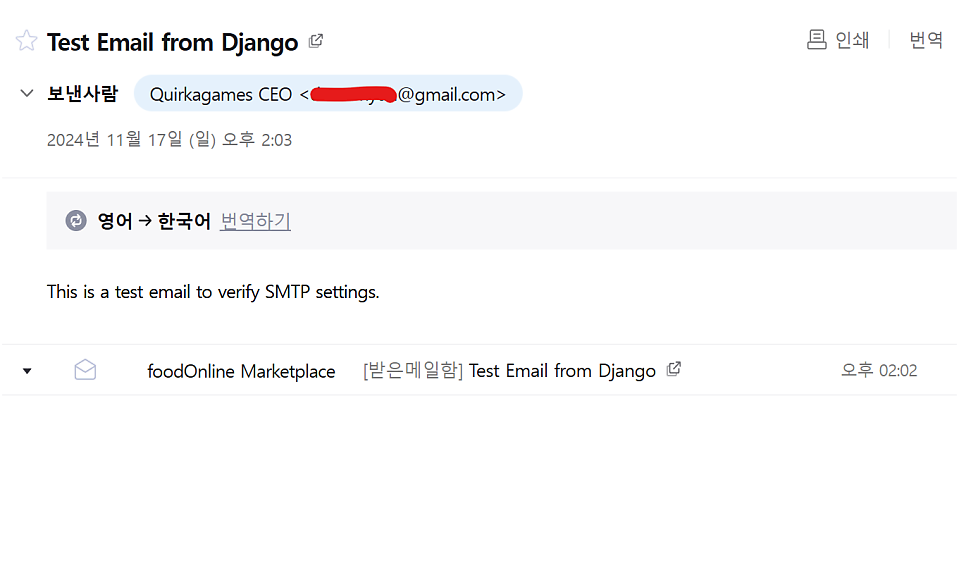
다음과 같이 잘 보내졌네요. ㅎㅎ

+추가) 회사 이름이나 직책을 앞세워서 보내고 싶을 때,
그런데 만약 회사 이름이나 직책을 앞세워서 보내고 싶을때도 있잖아요? ㅎㅎ
그러면 settings.py에 다음과 같이 추가해주면 됩니다.
1
DEFAULT_FROM_EMAIL = 'Quirkagames CEO '
그러고는 test_email()에 from_email을 DEFAULT_FROM_EMAIL로 바꿔줍니다.
헤헷..