smtp 구글 gmail 자동 보내기 테스트
구글 gmail에서는 간단한 설정으로 smtp 메일을 보내게 할 수 있습니다.
이전 포스팅에서는 gmail에서 앱 비밀번호를 만드는 방법을 다루었었습니다. https://blog.naver.com/devramyun/223470960849
[20240606] gmail 앱 비밀번호 만들기 앱에서 gmail에 로그인하기 위해서 다른 인증 방법이 더 있지만, '앱 비밀번호'를 만들어서 사용… 앱에서 gmail에 로그인하기 위해서 다른 인증 방법이 더 있지만, '앱 비밀번호'를 만들어서 사용…
앱 비밀번호를 만들면 띄어쓰기가 포함된 비밀번호가 생성됩니다. 그런데 이를 실제로 사용할 때는 모든 띄어쓰기(3번 있음)을 제거해주고 띄어쓰기 없이 사용해야 합니다.
python으로 smtp 메일링이 잘 작동하는지 테스트를 해볼 수 있습니다.
1
2
3
4
5
6
7
8
9
10
11
12
13
14
15
16
17
18
19
20
21
22
23
24
25
26
27
28
29
30
31
32
33
34
35
36
# test_smtp_mail.py
import smtplib
from email.mime.text import MIMEText
from email.mime.multipart import MIMEMultipart
from decouple import config

# Gmail SMTP 서버 정보
SMTP_SERVER = config('EMAIL_HOST')  # Gmail SMTP 서버 주소
SMTP_PORT = config('EMAIL_PORT', cast=int)  # Gmail SMTP 서버 포트

# Gmail 계정 정보
EMAIL_USER = config('EMAIL_HOST_USER')  # Gmail 계정
EMAIL_PASSWORD = config('EMAIL_HOST_PASSWORD')  # Gmail 앱 비밀번호

# 테스트 이메일 정보
to_email = config('EMAIL_CLIENT_USER')  # 수신자 이메일 주소

try:
    # 이메일 생성
    msg = MIMEMultipart()
    msg["From"] = EMAIL_USER
    msg["To"] = to_email
    msg["Subject"] = "Gmail App Password Test"
    body = "Hello, This is a test email to check Gmail App Password functionality."
    msg.attach(MIMEText(body, "plain"))

    # Gmail SMTP 서버에 연결
    with smtplib.SMTP(SMTP_SERVER, SMTP_PORT) as server:
        server.starttls()  # TLS 모드로 연결
        server.login(EMAIL_USER, EMAIL_PASSWORD)  # 로그인
        server.sendmail(EMAIL_USER, to_email, msg.as_string())  # 이메일 전송

    print("Test email sent successfully!")
except Exception as e:
    print(f"Error: {e}")
여기서 decouple 패키지는 계정 비밀번호 등 코드와는 달리 보안이 매우 중요한 정보들을 숨겨놓고 사용하기 위해 사용하는 패키지입니다.
다음 명령어로 설치합니다.
pip install python-decouple
그리고 프로젝트 루트 디렉토리에 .env라는 파일을 만들어서 다음과 같이 변수들을 설정해줍니다.
1
2
3
4
5
6
7
8
9
# .env 파일
# Email configuration
EMAIL_HOST=smtp.gmail.com
EMAIL_PORT=587
EMAIL_HOST_USER=보내는메일@gmail.com
EMAIL_HOST_PASSWORD=띄어쓰기없는앱비밀번호
EMAIL_USE_TLS=True

EMAIL_CLIENT_USER=받는메일@gmail.com
cmd에서 python 스크립트를 실행해주고,

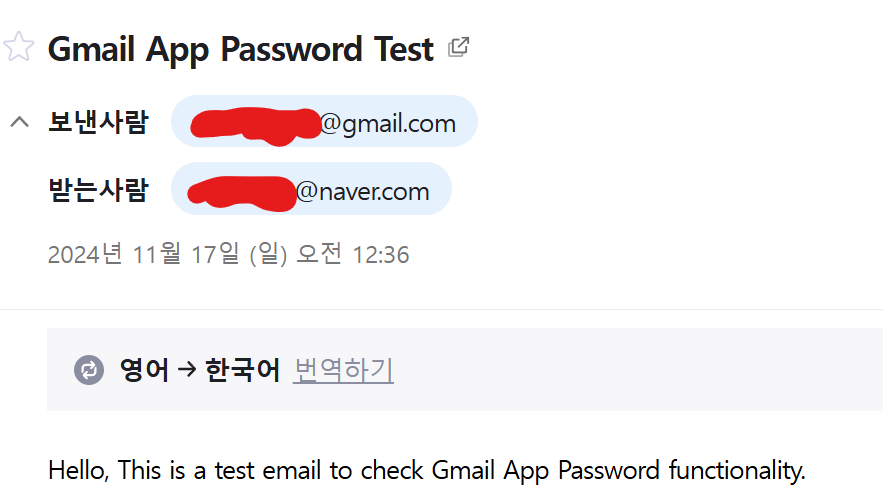
받은 메일함에 가보면 잘 와 있습니다.
+추가) 클래스화 버전
1
2
3
4
5
6
7
8
9
10
11
12
13
14
15
16
17
18
19
20
21
22
23
24
25
26
27
28
29
30
31
32
33
34
35
36
37
38
39
40
41
42
43
44
45
46
47
48
49
50
51
52
53
54
55
56
57
58
59
60
61
62
63
64
65
import smtplib
from email.mime.text import MIMEText
from email.mime.multipart import MIMEMultipart
from decouple import config

class smtp_email_test:

    def __init__(self):
        pass

    def send_email(self):
        # Gmail SMTP 서버 정보
        SMTP_SERVER = config('EMAIL_HOST')  # Gmail SMTP 서버 주소
        SMTP_PORT = config('EMAIL_PORT', cast=int)  # Gmail SMTP 서버 포트

        # Gmail 계정 정보
        EMAIL_USER = config('EMAIL_HOST_USER')  # Gmail 계정
        EMAIL_PASSWORD = config('EMAIL_HOST_PASSWORD')  # Gmail 앱 비밀번호

        # 테스트 이메일 정보
        to_email = config('EMAIL_CLIENT_TEST_USER')  # 수신자 이메일 주소

        try:
            # 이메일 생성
            msg = MIMEMultipart()
            msg["From"] = EMAIL_USER
            msg["To"] = to_email
            msg["Subject"] = "Gmail App Password Test"
            body = "Hello, This is a test email to check Gmail App Password functionality."
            msg.attach(MIMEText(body, "plain"))

            # Gmail SMTP 서버에 연결
            with smtplib.SMTP(SMTP_SERVER, SMTP_PORT) as server:
                server.starttls()  # TLS 모드로 연결
                server.login(EMAIL_USER, EMAIL_PASSWORD)  # 로그인
                server.sendmail(EMAIL_USER, to_email, msg.as_string())  # 이메일 전송

            print("Test email sent successfully!")
        except Exception as e:
            print(f"Error: {e}")

    def login(self):
        # Gmail SMTP 서버 정보
        SMTP_SERVER = config('EMAIL_HOST')
        SMTP_PORT = config('EMAIL_PORT', cast=int)

        # Gmail 계정 정보
        EMAIL_USER = config('EMAIL_HOST_USER')
        EMAIL_PASSWORD = config('EMAIL_HOST_PASSWORD')

        try:
            # Gmail SMTP 서버에 연결
            server = smtplib.SMTP(SMTP_SERVER, SMTP_PORT)
            server.starttls()  # TLS 모드로 연결
            server.login(EMAIL_USER, EMAIL_PASSWORD)  # 로그인
            print("Login successful!")
        except Exception as e:
            print(f"Error: {e}")
        finally:
            server.quit()

## Test
test = smtp_email_test()
test.login()
test.send_email()
이 기사는 저작권자의 CC BY 4.0 라이센스를 따릅니다.