[Ubuntu][WSL2]에러 System has not been booted with systemd as init system (PID 1).

1
2
3
4
$ sudo systemctl status

System has not been booted with systemd as init system (PID 1). Can't operate.
Failed to connect to bus: Host is down
윈도우에서 WSL2 가상화로 설치한 우분투에서는 systemctl 명령이 듣질 않습니다.
왜냐하면 WSL의 루트 시스템 프로세스는 systemd가 아닌 Init 이기 때문입니다.
Init의 시스템 프로세스 방식보다 systemd 방식을 선호하는 경우가 많이 있기 때문에 이걸 바꿔주면 좋습니다.
WSL 종료, PowerShell 오픈하여 입력 :
1
wsl --update
WSL(Ubuntu) 오픈하여 입력:
1
sudo -e /etc/wsl.conf
위의 wsl.conf 에 다음 추가 후 저장.
1
2
[boot]
systemd=true
WSL 종료, PowerShell 오픈하여 입력 :
1
wsl --shutdown
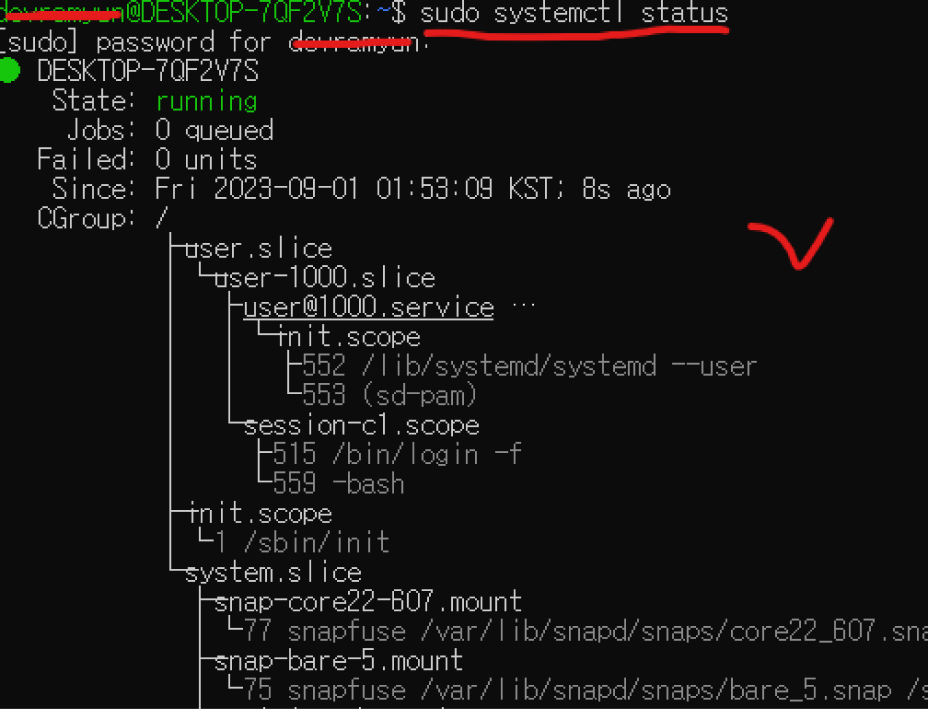
다시 WSL(Ubuntu) 오픈하여 테스트:
1
sudo systemctl status
System has not been booted with systemd as init system (PID 1). Can't operate I use WSL2 on Windows 11. I want to run the systemctl command in Ubuntu 20.04, but it gives me the following error: System has not been booted with systemd as init system (PID 1). Can't operate. F… I use WSL2 on Windows 11. I want to run the systemctl command in Ubuntu 20.04, but it gives me the following error: System has not been booted with systemd as init system (PID 1). Can't operate. F…