Unity에서 C# Nuget ZXing 사용하기
지난 포스팅 'Unity에서 C# Nuget HtmlAgilityPack 사용하기'의 후속 시리즈 포스팅입니다. 관심있으신 분은 아래 포스팅을 참조해주세요. https://blog.naver.com/devramyun/223229998700
[20231006] Unity에서 C# Nuget HtmlAgilityPack 사용하기 VisualStudio 혹은 Rider에서 HtmlAgilityPack을 다운로드받으면 패키지 폴더에서 찾을 수 있습니다…. VisualStudio 혹은 Rider에서 HtmlAgilityPack을 다운로드받으면 패키지 폴더에서 찾을 수 있습니다….
이번엔 다음 ZXing.Net을 설치해보겠습니다. 저는 바코드 인식을 위해 사용합니다. 다른 인터넷 자료에서는 unity용으로 Zxing을 다운로드받으려면 6년 전에 업데이트된 버전을 받아야 합니다. 그 동안 유니티도 많이 버전업했는데 6년 전껄 쓰는 건 왠지 피하고 싶죠.
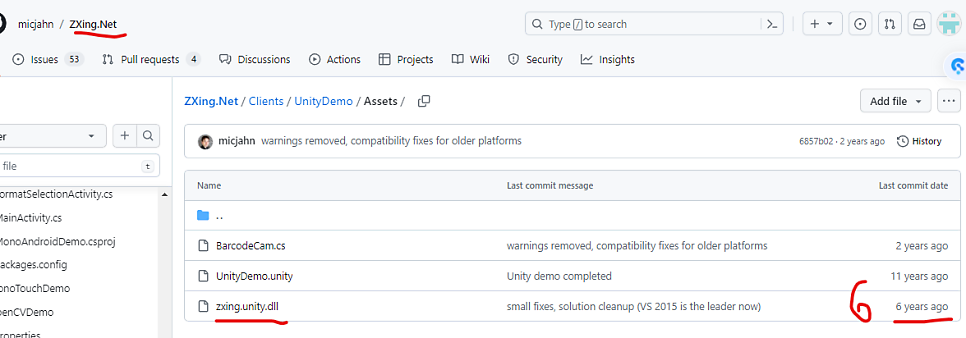
그래서 직접 최신 Nuget패키지를 다운로드 받고 빌드하려는 버전에 맞는 dll을 추출하기로 했습니다. https://www.nuget.org/packages/ZXing.Net
ZXing.Net 0.16.9 ZXing.Net is a port of ZXing, an open-source, multi-format 1D/2D barcode image processing library originally implemented in Java. It has been ported by hand with a lot of optimizations and improvements. It is compatible with .Net 2.0, .Net 3.5, .Net 4.x, .Net 5.x, .Net 6.x, .Net 7.x, Windows RT Clas… ZXing.Net is a port of ZXing, an open-source, multi-format 1D/2D barcode image processing library originally implemented in Java. It has been ported by hand with a lot of optimizations and improvements. It is compatible with .Net 2.0, .Net 3.5, .Net 4.x, .Net 5.x, .Net 6.x, .Net 7.x, Windows RT Clas…
VisualStudio 혹은 Rider에서 ZXing.Net을 다운로드받으면 패키지 폴더에서 dll을 찾을 수 있습니다.
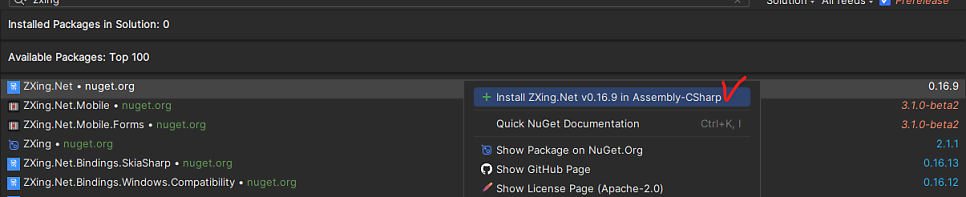
저는 유니티에서 최신 버전인 .Net Standard 2.1로 빌드할 예정입니다. ZXing.Net도 그에 맞는 걸 가져와서 유니티 프로젝트에 넣어줍니다.
그런데 유니티에서 쓰려면 이렇게 하면 좀 어렵습니다. ZXing.dll의 BarcodeReader() 함수가 ZXing.Unity.dll과는 좀 다릅니다. 그래서 그냥 간단히 해결하기 위해 6년 전 버전을 가져와 쓰기로 했습니다. https://github.com/micjahn/ZXing.Net/tree/master/Clients/UnityDemo/Assets
https://github.com/micjahn/ZXing.Net/tree/master/Clients/UnityDemo/Assets {“payload”:{“allShortcutsEnabled”:false,”path”:”Clients/UnityDemo/Assets”,”repo”:{“id”:72144644,”defaultBranch”:”master”,”name”:”ZXing.Net”,”ownerLogin”:”micjahn”,”currentUserCanPush”:false,”isFork”:false,”isEmpty”:false,”createdAt”:”2016-10-27T20:15:17.000Z”,”ownerAvatar”:”https://avatars.githubuse…
원하는 테스트 기능을 가지고 빌드하면 20MB정도밖에 안듭니다.

여기 ZXing.Net을 사용하기 이전에는 Unity Asset Store에서 구매할 수 있는 Easy ML Kit에 한 기능으로 있는 Barcode 스캐너를 사용했습니다. 그런데 원래 여러 기능을 묶어 놓은 asmdef를 가져와 사용하는 것이기 때문에 용량이 너무 컸습니다. QR코드 스캐닝 기능만 가지고 빌드했는데도 무려 80MB가 됬으니까요. https://assetstore.unity.com/packages/tools/integration/easy-ml-kit-220512
Easy ML Kit | Integration | Unity Asset Store Use the Easy ML Kit from Voxel Busters Interactive on your next project. Find this integration tool & more on the Unity Asset Store. Use the Easy ML Kit from Voxel Busters Interactive on your next project. Find this integration tool & more on the Unity Asset Store.

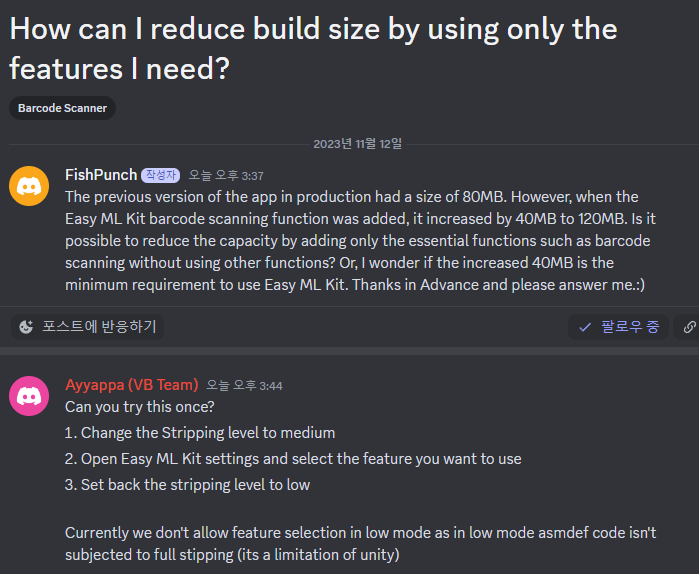
이걸 저의 로또앱에 얹으니, 원래 80MB이던 로또앱이 +40MB가 되어 120MB가 되었습니다! 무려 용량이 50%가 한번에 증가한 것이죠… 그래서 찾게 된 경량화된 패키지! ZXing을 사용해본 후기였습니다.
감사합니다.
+추가) 코드를 첨부하겠습니다.
1
2
3
4
5
6
7
8
9
10
11
12
13
14
15
16
17
18
19
20
21
22
23
24
25
26
27
28
29
30
31
32
33
34
35
36
37
38
39
40
41
42
43
44
45
46
47
48
49
50
51
52
53
54
55
56
57
58
59
60
61
62
63
64
65
66
67
68
69
70
71
72
73
74
75
76
77
78
79
80
81
82
83
84
85
86
87
88
89
90
91
92
93
94
95
96
97
98
99
100
101
102
103
104
105
106
107
108
109
110
111
112
113
114
115
116
117
using System;

using System.Collections;

using System.Collections.Generic;

using UnityEngine;

using ZXing;    //ZXing.dll 임포트 후 선언.


public class TestQRcode : MonoBehaviour

{

    private WebCamTexture camTexture;

    private Rect screenRect;


    static string strBarcodeRead;


    void Start()

    {

        strBarcodeRead = null;

        //카메라 화면 크기 조정 //기본 값 스크린 너비, 높이

        screenRect = new Rect(0, 0, Screen.width, Screen.height);

        camTexture = new WebCamTexture();

        camTexture.requestedHeight = Screen.height;

        camTexture.requestedWidth = Screen.width;


        //읽어 들이는 웹 캠 텍스쳐 값이 널이 아니면

        if (camTexture != null)

        {

            //카메라 동작 플레이.

            //만약 정지 시키고 싶다면 -> camTexture.Stop();

            //QR코드 인식 후 씬이 넘어간다면 반드시 Stop을 해주어야 카메라가 꺼진다.

            camTexture.Play();

        }

    }


    void OnGUI()

    {

        //OnGUI를 통한 화면에 가시화

        //카메라 화면 크기, 카메라에 쓰일 텍스쳐 값(웹 캠 텍스쳐), 화면에 맟게 그리기

        GUI.DrawTexture(screenRect, camTexture, ScaleMode.ScaleToFit);


        try

        {

            //Decode를 통한 QRcode 읽어 들이기.

            IBarcodeReader barcodeReader = new BarcodeReader();


            var result = barcodeReader.Decode(camTexture.GetPixels32(), camTexture.width, camTexture.height);


            //만약 결과 값이 널이 아니면

            if (result != null)

            {

                //인식한 QRcode의 텍스트 값을 로그.

                Debug.Log(result.Text);

                strBarcodeRead = result.Text;

            }

        }

        catch (Exception ex)

        {

            Debug.LogWarning(ex.Message);

        }

    }

}
위와 같이 사용하면 debug console에서 값을 확인하게 됩니다. 출처(https://simpleneed.tistory.com/35)
저는 좀더 효율적이도록 바꾸겠습니다.
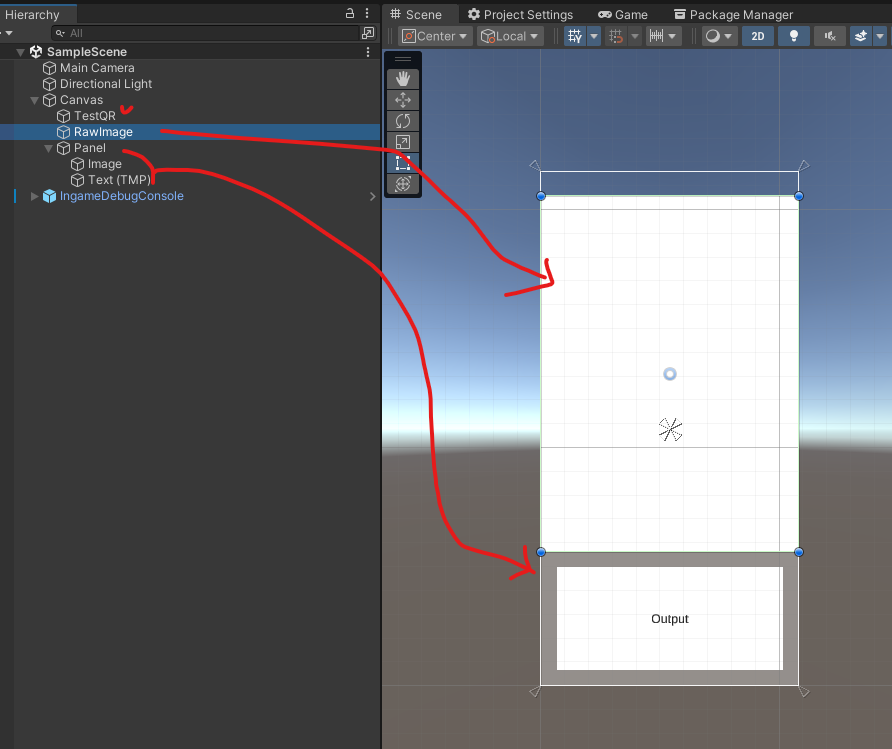
- Hierarchy에서 우클릭 → UI → Canvas 선택하여 새 Canvas를 생성합니다.
- Canvas를 선택한 상태에서 우클릭 → UI → RawImage 선택하여 RawImage UI 요소를 추가합니다.
- Canvas를 선택한 상태에서 우클릭 → UI → TextMeshPro - Text 선택하여 새 TextMeshPro UI 요소를 추가합니다.
- QRCodeScanner 스크립트가 적용된 GameObject를 선택합니다.
- Inspector에서 tmpText 필드에 TextMeshPro UI 요소를 드래그 앤 드롭합니다.
- 생성한 QRCodeScanner 스크립트를 적용할 GameObject에 추가합니다.
- 스크립트의 rawImageDisplay 필드에 RawImage UI 요소를 드래그 앤 드롭합니다.
1
2
3
4
5
6
7
8
9
10
11
12
13
14
15
16
17
18
19
20
21
22
23
24
25
26
27
28
29
30
31
32
33
34
35
36
37
38
39
40
41
42
43
44
45
46
47
48
49
50
51
52
53
54
55
56
57
58
using System;
using UnityEngine;
using UnityEngine.UI;
using TMPro;
using ZXing;

public class QRCodeScanner : MonoBehaviour
{
    public RawImage rawImageDisplay; // RawImage UI 요소
    public TextMeshProUGUI tmpText; // TextMeshPro UI 요소
    private WebCamTexture camTexture;

    static string strBarcodeRead;

    void Start()
    {
        strBarcodeRead = null;
        camTexture = new WebCamTexture();
        camTexture.requestedHeight = Screen.height;
        camTexture.requestedWidth = Screen.width;

        if (camTexture != null)
        {
            camTexture.Play();
            rawImageDisplay.texture = camTexture;
            rawImageDisplay.material.mainTexture = camTexture;
        }
    }

    void Update()
    {
        try
        {
            IBarcodeReader barcodeReader = new BarcodeReader();
            var result = barcodeReader.Decode(camTexture.GetPixels32(), camTexture.width, camTexture.height);

            if (result != null && strBarcodeRead != result.Text)
            {
                strBarcodeRead = result.Text;
                tmpText.text = strBarcodeRead; // TextMeshPro 텍스트 업데이트
                Debug.Log(result.Text);
            }
        }
        catch (Exception ex)
        {
            Debug.LogWarning(ex.Message);
        }
    }

    void OnDestroy()
    {
        if (camTexture != null)
        {
            camTexture.Stop();
        }
    }
}
25MB용량의 apk로도 잘 작동하네요!
[영상]